Flashforge Adventurer 5M Review: Fast Auto-Leveling Printer (October 2026)
The Flashforge Adventurer 5M is a good fit for single-color parts and prototypes if you want CoreXY motion, automatic bed leveling and quick nozzle changes. Choose the Bambu Lab A1 instead if larger single-piece models or an optional multicolor system matter more.
On this page (10 sections)
- Who should buy the Flashforge Adventurer 5M?
- How much room do your models need?
- What does its speed mean for real projects?
- Which nozzle should you start with?
- How should you set up the Adventurer 5M?
- What does automatic leveling handle?
- How do you care for the plate and nozzle?
- Which alternative suits a different buyer?
- Which buying mistakes should you avoid?
- Should you choose the Flashforge Adventurer 5M?
The Flashforge Adventurer 5M is a good choice for single-color prototypes and household parts if you want automatic bed leveling, CoreXY motion and quick nozzle changes. Choose it around the objects you plan to make, rather than its maximum speed figure.
Its strongest fit is a maker who wants to revise a bracket, resize an organizer or print hobby parts without manual bed adjustment. Larger single-piece objects and automated multicolor projects are stronger reasons to consider the Bambu Lab A1.
Who should buy the Flashforge Adventurer 5M?
Buy the Adventurer 5M if your usual models fit its build area and you want to switch between everyday printing and different nozzle sizes. Skip it if your main goal requires more space or a confirmed automated multicolor system.
Flashforge Adventurer 5M
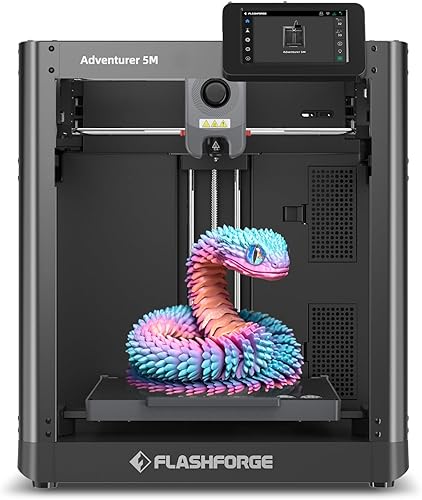
- Automatic bed leveling
- All-metal CoreXY structure
- Quick-change nozzle system
- Dual-sided PEI platform
A good fit for makers who print repeated design revisions and want less manual bed adjustment. Its quick-change nozzle system lets you choose between finer detail and wider lines with optional nozzles.
Pros
- Automatic bed leveling reduces manual adjustment
- Quick-change nozzle system
- Dual-sided PEI platform
- Remote monitoring through Flash Studio
Cons
- Less build space than the Bambu Lab A1
- Alternative nozzle sizes require separate purchases
Where the Flashforge Adventurer 5M makes sense
Repeated design revisions are a good match for this printer's motion system and nozzle choices. A rough fit-check part can use a different profile from the final version, where surface finish or small details matter more.
Household organizers, model components and hobby fixtures also fit this approach. Check the finished part's strength and material suitability before using it under load, near heat or in another demanding role.
The main buying question is how often you'll use that flexibility. If you expect to leave one nozzle installed and print occasional downloaded models, calibration, software and build space may matter more than nozzle changes.
How much room do your models need?
The Adventurer 5M provides 220 x 220 x 220 mm of build space, which suits many small and medium objects. Open a few actual project files in a slicer before deciding that this is enough.
Check the model with supports and any brim included. A wide object can fit by itself yet leave too little room for the extra material needed to hold it securely during printing.
Rotation can help, but it also changes support needs, surface finish and strength. For FDM prints, layer direction matters because a part can be weaker across layer bonds than along the printed lines.
Splitting a large model is another option. It adds joints, alignment work and finishing, so favor a larger printer if you want smooth, single-piece objects regularly.
If you're still weighing size against setup and materials, use our 3D printer buying guide for beginners to narrow your requirements before comparing machines.
What does its speed mean for real projects?
Flashforge claims 600 mm/s travel speed and 20,000 mm/s² acceleration for the Adventurer 5M. Travel speed covers movement between print areas, so it is not a promise that filament will be deposited at that speed throughout a job.
A broad, simple shape gives the printer more room to build speed than a tiny model with frequent turns. Fine details, supports and slower outer walls can also make up a large share of the total print time.
The printer has a high-flow nozzle rated at 32 mm³/s, vibration compensation and dual-fan cooling. Flashforge also claims a 35-second warm-up to 200°C, though warm-up is only one part of preparing and completing a print.
Use the slicer's time estimate with the correct machine, filament and nozzle profiles. That gives you a more useful planning figure than comparing maximum speeds across printers.
Start with a standard profile and change one setting at a time. If raised speed causes ripples near corners or gaps in lines, return to the previous profile before adjusting anything else.
Which nozzle should you start with?
Start with the included 0.4 mm nozzle for general models, organizers and household parts. The Adventurer 5M accepts optional sizes from 0.25 mm to 0.8 mm, but buy extras only when a project needs them.
A smaller nozzle can form narrower lines for tiny lettering or fine features. It usually requires more passes to fill an area, so added detail comes with longer print times.
A larger nozzle suits broad walls and less detailed parts where wider lines are useful. It cannot preserve every small feature, and raising line width also increases the amount of material the extruder must deliver.
Flashforge describes nozzle changes as taking 3 seconds. Treat that as the change mechanism's claim, not the full time needed to follow temperature precautions, select a new profile and recalibrate as directed.
The 280°C direct drive extruder gives you temperature headroom, but temperature alone does not establish filament compatibility. Check the complete material requirements, including the build surface, nozzle type and printing environment.
Our guide to PLA, PETG and other 3D printer filament options explains how to choose a material around the part's job.
How should you set up the Adventurer 5M?
Set it on a stable surface with room for access, then follow Flashforge's assembly, loading and calibration instructions. Prepare the workspace before trying to shorten the first print.
The printer measures 15.83 x 14.29 x 17.64 in and weighs 22 lb. Leave additional room for filament routing, cables, plate removal and access to parts that need cleaning.
Choose a suitable, ventilated location and keep the working area clear. If the materials you plan to use need controlled surroundings, read our guide to enclosed versus open-frame 3D printers before choosing your setup.
For the first few jobs:
- Select the exact printer and nozzle profile. A file prepared for another machine may use unsuitable motion or temperature settings.
- Load a supported filament. Use its matching profile rather than guessing temperatures.
- Clean the build surface as directed. Avoid touching the printing area after cleaning.
- Run the required calibration. Follow the printer's prompts before starting.
- Begin with a small, simple model. Check the first layer before moving to a long job.
Flash Studio supports remote progress monitoring, settings adjustments and status alerts. Use those tools to follow a job while still following Flashforge's operating and supervision guidance.
What does automatic leveling handle?
Automatic leveling reduces manual bed adjustment, but it cannot remove grease from a plate or correct every poor first layer. Cleanliness, material settings and nozzle condition still affect adhesion.
Look for a first layer with connected lines and a stable outline. Loose strands, lifting edges or lines that fail to join are reasons to stop and correct the cause before more material builds up.
Start troubleshooting with simple checks: the selected profile, plate condition and calibration procedure. Changing several settings at once makes it harder to find the cause.
Our guide to how to level a 3D printer and why auto-leveling helps explains the relationship between bed leveling and nozzle height.
How do you care for the plate and nozzle?
Keep the dual-sided PEI platform clean and follow Flashforge's cooling and removal instructions. Forcing a part off too soon can make removal harder and risk damage.
Remove loose scraps before each job, including material near the print area. Use cleaning methods approved for the surface rather than scraping it with an unsuitable tool.
Keep filament dry according to its storage needs. Moisture can contribute to popping, rough surfaces and inconsistent extrusion, which can look like a printer setting problem.
If extrusion becomes uneven, check that the spool feeds freely and the filament path is clear. Follow the nozzle cleaning procedure before compensating with higher temperatures or slower speeds.
Use the maintenance schedule for belt, motion and nozzle care. Avoid adding lubricant or adjusting tension without the relevant instructions.
Which alternative suits a different buyer?
Choose the A1 for more build space and a multicolor path, the Centauri 2 for automatic pre-print checks, or the Ender 3 V3 SE for learning everyday filament printing. Each addresses a different reason to pass on the Adventurer 5M.
Bambu Lab A1: for larger projects and multicolor plans
The A1 has a 256 x 256 x 256 mm build volume, full-auto calibration and active flow rate compensation. Its calibration covers Z-offset, bed leveling, vibration resonance and nozzle pressure before each job.
Choose it if larger parts or future multicolor work are central to your plans. AMS lite is required for multicolor printing, so select the Combo or account for the separate accessory.
Skip the A1 if its added space and color option won't help your projects and you specifically want the Adventurer's CoreXY design. For connection preferences, the A1 supports both Bambu Cloud Service and LAN-only mode.
Our Flashforge Adventurer 5M vs Bambu Lab A1 comparison explores that choice, while the Bambu Lab A1 review covers the alternative in more detail.
Elegoo Centauri 2: for checks before every job
The Centauri 2 pairs automatic calibration and smart pre-print checks with a CoreXY system. Its 5-inch touchscreen, ElegooSlicer workflow and ELEGOO Matrix remote monitoring suit buyers who want those controls.
Elegoo claims speeds up to 500 mm/s and acceleration of 20,000 mm/s². Its magnetic printhead cover, semi-automatic belt tensioner and nozzle wiper are useful features to compare if routine maintenance shapes your choice.
Choose it for that combination of setup checks and maintenance access. Skip it for frequent moves, given its 30.1 lb weight, and confirm its build volume before choosing it for a large project.
Creality Ender 3 V3 SE: for everyday filament skills
The Ender 3 V3 SE combines CR Touch auto leveling, automatic Z-offset calibration and a Sprite direct drive extruder supporting PLA, PETG and TPU. It needs assembly, so choose it if you're comfortable completing that initial work.
Creality gives maximum figures of 250 mm/s and 2,500 mm/s² acceleration. Dual synchronized Z-axis lead screws support motion stability, while its flexible PC spring steel plate helps with part removal.
Choose it for those everyday material options and assisted first-layer setup. Skip it if the Adventurer's quick nozzle changes and higher stated acceleration are central to your plans.
Read our Creality Ender 3 V3 SE review for its setup details. The broader Bambu Lab, Creality, Elegoo or Anycubic brand comparison can help if you're still choosing a software ecosystem.
Which buying mistakes should you avoid?
Avoid choosing by maximum speed alone, and check your real project files before paying for features. The wrong build size or material fit creates more work than a slower profile.
- Buying nozzle sizes without a purpose: Begin with the standard nozzle and identify a detail or time problem before adding another.
- Using nozzle temperature as a compatibility guide: Filaments can also require a suitable nozzle, surface and environment.
- Scaling a functional part just to fit: Resizing can change screw holes, clearances and wall thickness.
- Ignoring supports: Orientation affects wasted material, removal work and visible marks.
- Planning only for the printer's dimensions: Leave space to load filament and remove finished parts.
- Changing several settings after a failure: Correct one likely cause, then check the result.
If you don't yet have a project list, explore what you can do with a 3D printer at home. Pick a few useful objects and use them to judge the printer's size and material needs.
Should you choose the Flashforge Adventurer 5M?
Choose the Flashforge Adventurer 5M for repeated single-color projects that fit its build area, especially if you'll use different nozzle sizes. Its appeal is the combination of automatic leveling, CoreXY motion and a quick-change nozzle system.
Choose the A1 when larger objects or automated multicolor printing matter more. Favor the Centauri 2 for its pre-print checks and maintenance features, or the Ender 3 V3 SE for its everyday filament support and assisted setup.
Before ordering, open your largest planned model in the correct slicer profile and check its supports and orientation. If the A1 remains your closest alternative, use our Adventurer 5M versus A1 guide to make the final choice.
Frequently asked questions
Is the Flashforge Adventurer 5M good for beginners?
Yes, the Adventurer 5M suits beginners who want automatic bed leveling and a quick-change nozzle system. Start with a supported filament and matching slicer profile, then watch the first layer.
You still need to learn plate cleaning, model orientation and supports before tackling more demanding projects.
What is the build volume of the Flashforge Adventurer 5M?
The Adventurer 5M has a 220 x 220 x 220 mm build volume. Check your model in the slicer with its supports, brim and final orientation included.
If your planned objects regularly exceed that space, the Bambu Lab A1 offers a larger 256 x 256 x 256 mm volume.
Does the Adventurer 5M level itself?
Yes, the Adventurer 5M includes automatic bed leveling to reduce manual bed adjustment. That does not remove the need for a clean plate and a suitable filament profile.
Follow Flashforge's calibration instructions, and inspect the first layer before allowing a long print to continue.
Can the Flashforge Adventurer 5M print multicolor models?
Choose the Bambu Lab A1 with AMS lite if automated multicolor printing is a firm requirement. Confirm a supported multicolor workflow with Flashforge before buying the Adventurer 5M for that purpose.
Painting finished parts or assembling separately printed colors can suit some projects, but neither replaces automatic color changes.