Enclosed vs Open-Frame 3D Printer: Which Is Better? (October 2026)
Choose an enclosed 3D printer for ABS and ASA projects; choose an open frame for everyday PLA and easier access. The enclosed vs open 3D printer decision starts with your filament, then your workspace and maintenance needs.
On this page (9 sections)
- Enclosed vs open 3D printer: what is the main difference?
- Which frame is better for your filament?
- Which of these printers fits your projects?
- How much space does each frame need?
- How should you set up an enclosed or open printer?
- Does an enclosure improve quality, noise or air control?
- What care does each frame need?
- Which buying mistakes should you avoid?
- Is an enclosed or open-frame 3D printer better for you?
Choose an enclosed 3D printer for ABS and ASA projects; choose an open frame for everyday PLA and easier access. The enclosed vs open 3D printer decision starts with what you'll print, then where the machine will run.
An enclosure shelters the print from drafts and helps retain warmth. An open frame makes it easier to reach the bed, inspect a stopped machine and handle routine care.
Neither frame replaces suitable filament settings or a clean build surface. For a first machine, our beginner 3D printer buying guide explains the other choices that matter, including print size and setup.

Enclosed vs open 3D printer: what is the main difference?
An enclosed printer surrounds the print area with panels, while an open-frame printer exposes it to room air. The main trade-off is a more sheltered printing environment versus simpler access.
That difference matters most while hot plastic cools. Uneven cooling can pull a part's corners upward or strain the bond between layers, especially with materials prone to shrinking.
An enclosure helps reduce sudden changes around the part. It doesn't automatically provide a heated chamber or precise chamber temperature control, so check those features separately if a material requires them.
An open frame lets heat disperse more readily. That suits many PLA projects, but a nearby air vent or open window can change conditions during a long print.
Enclosed vs open-frame printing: which trade-off matters most?
Material needs should come before access preferences. A convenient open machine won't solve a project that requires conditions it cannot maintain.
If both frame styles suit your material, compare the work you'll do around the machine. Frequent nozzle access and print removal favor an open layout, while draft protection favors an enclosure.
Frame style also doesn't determine automation. Both enclosed and open printers can offer automatic leveling, so compare setup features separately.
Which frame is better for your filament?
PLA usually suits an open frame, while ABS and ASA favor an enclosure. PETG and TPU don't automatically require a closed case, though each printer must support the material you choose.
Our guide to PLA, PETG and other beginner filaments explains how material choice affects the finished part. Choose a filament for the job before buying a machine around it.
For PLA, prioritize straightforward use
An open printer is a sensible starting point for PLA organizers, decorative models and early design projects. A stable room and suitable settings are usually more useful than adding panels.
PLA also works in compatible enclosed printers. Follow the manufacturer's guidance on doors and airflow because excessive warmth around the filament path can cause feeding trouble.
Don't choose a closed frame just because it looks more complete. If PLA covers your plans, calibration, bed access and usable print space may matter more.
For ABS and ASA, plan around heat and ventilation
An enclosure is a practical priority for ABS and ASA because these materials are more sensitive to cooling and shrinkage. Larger parts with broad bases can make warping harder to manage.
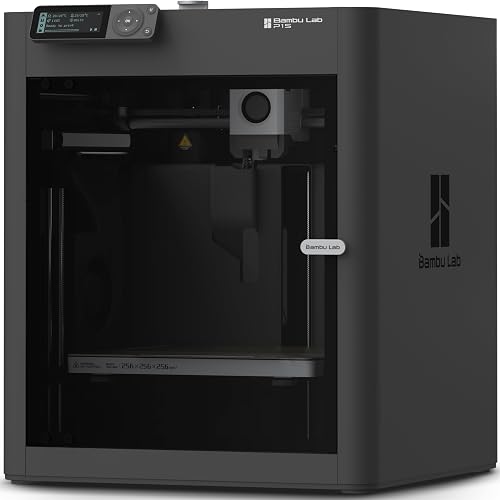
The Bambu Lab P1S supports both materials. It also supports PLA, PETG, TPU, PVA and PET, with PA and PC described as capable materials.
That range doesn't make every material equally simple to use. Filament drying, suitable temperatures and a compatible build surface still matter, especially as you move beyond everyday materials.
For PETG and TPU, check the printer and filament path
PETG and TPU buyers should focus on supported settings, feeding and storage rather than assume an enclosure is required. Damp filament can cause poor surfaces and uneven extrusion that panels won't solve.
Flexible TPU also places demands on the feeding path. Don't assume a printer's filament compatibility means every external multicolor feeder can handle that same filament.
Which of these printers fits your projects?
Choose the A1 for automatic setup, the P1S for a clear enclosure need, or the Ender 3 V3 SE for everyday filament work with some assembly. Their different roles matter more than choosing a frame in isolation.
Bambu Lab A1: for beginners who want fewer setup adjustments
The A1 suits a first-time buyer whose main goal is making useful objects without learning every calibration step first. Its full-auto calibration covers Z-offset, bed leveling, vibration resonance and nozzle pressure.
Active flow rate compensation adjusts extrusion using sensor readings. The 1-Clip quick swap nozzle also makes it worth considering if convenient nozzle changes matter to your plans.
Its build volume is 256 x 256 x 256 mm. Compare that space with your largest planned part, allowing room for supports and the orientation the part needs.
Skip the A1 if your buying reason is a factory-enclosed print area. Also include the AMS lite in your plans if multicolor printing is essential, since the printer requires it for that feature.
Bambu Lab P1S: for buyers planning ABS or ASA parts
The P1S is the stronger fit here when your projects call for an enclosed body. Bambu Lab says that design improves performance with advanced filaments.
Automatic bed leveling helps with setup, but the main reason to choose it in this comparison is material flexibility within a sheltered print area. It suits a buyer with a real plan for more demanding parts.
Skip it if you mainly want simple PLA models and value unrestricted access above enclosure benefits. At 38.9 pounds, it also needs a stable, planned location rather than a spot you expect to clear after every job.
Don't buy it on the assumption that enclosure means universal material support. Carbon and glass fiber reinforced polymer is not recommended for this model.
Creality Ender 3 V3 SE: for everyday parts and willing learners
The Ender 3 V3 SE suits buyers who want to make common filament projects and are comfortable completing initial assembly. Its Sprite Direct Drive extruder supports PLA, PETG and TPU.
CR Touch auto leveling and automatic Z-offset calibration reduce manual setup work. A flexible PC spring steel build plate helps with removing completed parts once they have cooled as instructed.
Choose it if those materials cover your plans and you want direct access for learning routine care. Allow time to understand slicer profiles, bed cleaning and first-layer behavior rather than expect automation to cover every task.
Skip it if you need an enclosed machine for ABS or ASA from the start. Don't base your choice on maximum speed alone, since part shape, filament and settings determine useful working speeds.
How much space does each frame need?
Measure the operating space, not just the printer body. You need room for moving parts, filament, cables, print removal and maintenance.
For an open printer with a moving bed, allow for its full travel. Keep cables and nearby objects clear throughout that movement, including behind the machine.
For an enclosed model, check door swing and access to removable panels. A cabinet that fits the body may still block the route you need for cleaning or service.
Use a firm, level surface that won't wobble during motion. Keep the printer away from curtains, loose storage and places where people might bump the table.
Plan filament storage nearby without blocking vents or service points. If you expect to add multicolor equipment, leave room for it and its filament paths before deciding the printer fits.
How should you set up an enclosed or open printer?
Start with the manufacturer's assembly and calibration steps, then use a profile for your exact printer and filament. Frame style doesn't change the need for a clean bed and a sound first layer.
Place an open printer away from direct airflow from fans, vents and windows. For an enclosed model, keep required ventilation clear and follow the recommended door position for the material.
Remove packing restraints and check the filament route before starting. Run the required calibration after assembly, moving the printer or making changes that call for it.
Begin with a small, simple part so you can inspect the first layer and feeding behavior. A large overnight project is a poor way to find a setup mistake.
Watch whether the first layer forms joined lines that stay attached. If it fails, stop and check the bed surface, selected profile and calibration rather than changing several settings at once.
Our guide to bed leveling and automatic leveling explains what leveling can correct. It also helps separate bed height problems from poor adhesion.
Does an enclosure improve quality, noise or air control?
An enclosure helps most when drafts and uneven cooling are causing print problems. It cannot correct damp filament, a dirty bed, a worn nozzle or the wrong slicer profile.
For corners that lift, check the material's temperature guidance and bed preparation first. If layers shift sideways, inspect movement and obstructions rather than assume the room needs more warmth.
For broader context, how a 3D printer works explains how feeding, movement and cooling work together. That makes it easier to change the setting related to the fault.
Noise also needs a separate decision. Fans, motors and vibrations all contribute, and a closed body doesn't establish how quiet the machine will be in your room.
Bambu Lab says the A1 uses active motor noise canceling, while Creality says the Ender 3 V3 SE's silent mainboard helps reduce operating noise. Neither feature removes every source of sound.
For placement and vibration advice, read how to make a 3D printer quieter. Avoid choosing a bedroom location simply because a printer has panels.
A closed body also doesn't establish effective emission control. Plan ventilation around the printer and filament instructions, and keep children and pets away from the machine.
What care does each frame need?
Both designs need clean build surfaces, clear movement paths and routine inspection. An open frame makes access easier, while an enclosure adds doors, panels and interior corners to clean around.
Let the machine stop and cool as instructed before removing debris or handling the nozzle area. Follow the manual for powering down, lubrication and replacing wear parts.
Keep filament scraps away from rails, belts and fans. Avoid applying lubricant or cleaning chemicals to parts unless the manufacturer calls for them.
Store filament according to its moisture needs. An enclosure around the printer doesn't replace dry storage, and leaving a spool inside a closed machine doesn't necessarily keep it dry.
Check adhesion and calibration after maintenance. Automatic leveling helps account for bed height differences, but it doesn't remove grease from the build surface.
Which buying mistakes should you avoid?
Don't buy an enclosure to solve a problem you haven't identified. Match the machine to your material, space and next few projects before adding accessories.
- Buying for vague future needs: Name a part that requires a more demanding material before choosing a printer mainly for that capability.
- Closing every panel for every filament: Use the recommended airflow and door position, especially with PLA.
- Covering an open printer without checking compatibility: Trapped heat can affect electronics as well as the part.
- Confusing a larger body with more print space: Compare usable build volume with the model you want to make.
- Ignoring access: Leave enough room to clean the bed, load filament and reach service points.
- Treating multicolor as part of the frame choice: Check the required feeder separately; an enclosure doesn't add color changes.
If you're unsure how often you'll use the machine, start with whether a 3D printer is worth it for home use. A short list of useful projects makes the buying decision much clearer.
Is an enclosed or open-frame 3D printer better for you?
For an enclosed vs open-frame 3D printer, choose by the material you'll use regularly and the workspace you can provide. Then choose the model whose setup and care fit your time.
Pick the A1 for everyday projects when automatic calibration is your main priority. Pick the Ender 3 V3 SE if PLA, PETG and TPU cover your plans and you're comfortable with assembly.
Pick the P1S when ABS or ASA is part of a clear project plan and you can provide suitable placement and ventilation. Its enclosure addresses a material need rather than serving as a reason to buy by itself.
For a possible add-on enclosure, read Do You Need an Enclosure for a 3D Printer?. If you've settled on a factory-enclosed machine, use our enclosed 3D printer guide to compare your next options.
Frequently asked questions
Is an enclosed 3D printer better than an open one?
An enclosed printer is better for materials that need protection from drafts and uneven cooling, such as ABS and ASA. An open printer suits many everyday PLA projects and gives easier access for care, so choose by your main filament, available workspace and willingness to manage the printing environment.
Can you print PLA on an enclosed 3D printer?
Yes, an enclosed printer can print PLA when the model supports it, and the Bambu Lab P1S does. Follow the printer's instructions for door position, temperature and airflow because excess chamber warmth can cause feeding problems, so keeping every panel closed is not always the right approach.
Do open-frame 3D printers need an enclosure?
No, an open-frame printer usually doesn't need an enclosure for everyday PLA projects in a stable room. Before adding one, check whether the manufacturer permits enclosed use and how it affects component cooling, since a homemade cover can trap heat around electronics as well as around the print.
Does an enclosure make a 3D printer safer?
Panels can reduce incidental contact with moving parts, but an enclosure doesn't make a printer childproof or remove emissions. Use a stable location away from children and pets, follow ventilation guidance for the printer and filament, and remember that hot components remain hazardous after the motion stops.


