3D Printers for Beginners: The Complete Buying Guide
The best 3D printer for beginners for general home projects is an FDM model with automatic calibration and support for PLA. Choose the Bambu Lab A1 for broader calibration help, the Flashforge Adventurer 5M for quick nozzle changes and app monitoring, or the Creality Ender 3 V3 SE for a straightforward start with room to explore different filaments.
On this page (12 sections)
- What should a beginner look for in a 3D printer?
- Is FDM or resin better for a first printer?
- Which features matter most after automatic leveling?
- Which beginner printer suits your projects?
- What filament should a beginner use?
- How much does a beginner 3D printer cost to own?
- How should you prepare the space before delivery?
- How do you get a successful first print?
- What routine care does a beginner printer need?
- Which common mistakes should beginners avoid?
- Is a 3D printer worth it for home use?
- How do you choose a 3D printer for beginners?
The best 3D printer for beginners is an FDM model with automatic calibration, support for PLA and enough build space for your actual projects. Among the options here, the Bambu Lab A1 fits buyers who want more calibration help, while the Flashforge Adventurer 5M and Creality Ender 3 V3 SE suit different priorities.
Start with the objects you want to make, then choose the machine. A larger build area or faster motion system offers little benefit if your main goal is small desk organizers.
This guide covers the buying decision, each printer's best use, your first print and routine care. For a shorter shortlist, see our best 3D printers for beginners.
What should a beginner look for in a 3D printer?
Choose by project size, calibration help, material needs and available space. Those factors shape your everyday use more than a headline speed figure.
Write down 3 objects you expect to print during your first month. For each, note its size, whether it needs fine detail and whether it will face heat, bending or outdoor use.
| Your main goal | What to prioritize |
|---|---|
| Desk organizers and small household items | PLA support, automatic calibration and easy print removal |
| Larger hobby models | Enough build space, including room for supports |
| Small parts that must fit together | Slicer control, material choice and small practice pieces |
| Detailed miniature figures | Surface detail and willingness to handle a resin workflow |
| Decorative objects with several colors | A suitable multicolor system and room for its equipment |
| Learning how printing works | Accessible maintenance and time to learn settings |
A downloadable model can give you a useful size reference before you buy a printer. Open it in a slicer, the program that turns a 3D model into printer instructions, and check its dimensions.
If you need project ideas, our guide to what you can do with a 3D printer at home can help you build that first-month list.
Which 3D printer for beginners is easiest to set up?
The easiest 3D printer for beginners reduces calibration work while making everyday tasks clear. The Bambu Lab A1 is the strongest fit here for buyers who want broader calibration automation.
Automatic leveling measures height differences across the build surface. Z-offset sets the nozzle's working distance from that surface, which affects whether the first layer sticks properly.
These features help with different parts of setup, so don't treat every automatic feature as the same thing. You will still load filament, prepare files and watch the start of a print.
For the basic workflow, read how a 3D printer works. Our guide to leveling a 3D printer explains what calibration can fix and what still needs your attention.
Is FDM or resin better for a first printer?
Choose FDM for most general home projects and resin when fine detail is your main reason for buying. Resin adds material handling and cleanup steps that should influence the decision from the start.
FDM printers feed solid filament into a heated nozzle and place it in layers. They suit organizers, brackets, hobby models and many larger objects.
Resin printers use light to cure liquid resin. Small figures and fine surface details can benefit from that process, but finished parts usually need washing and further curing.
Plan the whole resin workspace before choosing a machine. That includes suitable ventilation, protective equipment, a cleanup area and handling waste according to the material instructions and local requirements.
FDM also needs a suitable workspace and ventilation. A printer's convenience features do not remove the need to follow its placement and material instructions.
Skip resin if you mainly want household items and have no suitable place for the cleanup routine. Skip FDM as your default choice if tiny decorative detail is your only goal and visible layer lines would disappoint you.
Our guide to resin 3D printers for beginners explains that workflow. For the broader choice, see resin vs FDM 3D printers.
Which features matter most after automatic leveling?
Prioritize usable build space, practical maintenance and software you can work with. Treat speed, extra colors and specialized materials as benefits only when they serve a project you expect to make.
How much build area do you need?
Choose enough room for your largest planned object, including any supports or bed adhesion aids. A model that barely fits the build area may need a different orientation or several separate pieces.
Build volume describes the space available for printing, not the size of the machine. A printer also needs room for moving parts, cables, filament and your hands.
Splitting a large model into sections is often possible, but it adds assembly work. Decide whether joining parts is acceptable before choosing a smaller printer.
Scaling a model down can solve a size problem for a decoration. It can also change screw holes, slots and other features that need to fit an existing object.
How should you judge speed claims?
Use a slicer's estimate for your chosen model rather than comparing maximum speeds alone. Travel speed describes movement without depositing filament, while printing speed concerns movement during extrusion.
A small, detailed part may involve many short moves and direction changes. It may never spend much time near the printer's maximum speed.
Material also limits useful speed. Filament needs enough heat and time to flow properly, while fresh layers need suitable cooling.
Begin with the recommended profile and learn what a good result looks like. Increase speed only after you can recognize whether a change harms corners, surfaces or layer adhesion.
Do you need an enclosure?
An enclosure is a material and placement choice, rather than a required beginner upgrade. Many PLA projects can use an open-frame setup in a suitable location.
A cover can reduce drafts and limit casual access to moving parts. It can also hold heat, change access and take more room than you expect.
Don't assume that enclosing a printer makes every material suitable or removes ventilation needs. Follow the printer's guidance before adding a cover or choosing a material that needs a warmer environment.
Compare the practical differences in our guide to enclosed vs open-frame 3D printers.
Is multicolor printing worth the extra setup?
Multicolor is worth considering for objects whose colors are part of the design, such as signs or decorative figures. Start with one color if you mainly want organizers or useful parts.
Automatic color changes can add print time and waste filament during transitions. A design with frequent changes may use more material than the finished object suggests.
Separate colored pieces that fit together can be a simpler option for some projects. Read about what AMS is and whether you need one before building your setup around automatic color changes.
Which beginner printer suits your projects?
Choose the A1 for calibration help, the Adventurer 5M for nozzle flexibility and app monitoring, or the Ender 3 V3 SE for learning with everyday filaments. Each has useful beginner features, but the reasons to buy differ.
Bambu Lab A1: for buyers who want more calibration help
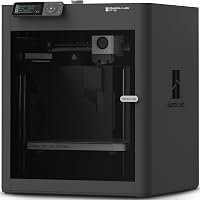
The Bambu Lab A1 suits a beginner who wants to spend more time preparing models and less time making manual calibration adjustments. Its full-auto calibration covers bed leveling, Z-offset, vibration resonance and nozzle pressure.
The A1 also has active flow rate compensation, which adjusts extrusion using sensor readings. Its touchscreen gives you a direct interface for everyday printer controls.
Maintenance features include a 1-Clip quick-swap nozzle. Active motor noise canceling addresses motor sound, though placement still matters in a shared room.
You can connect through Bambu Cloud Service or use LAN-only mode. The local option is useful if keeping printer communication on your network is part of your buying decision.
For multicolor work, you need AMS lite, included with the A1 Combo or available separately. Don't plan a multicolor workflow around the base printer alone.
Buy it if you want broader calibration automation and room for larger single-piece projects. Skip it if your space is tight or your small, single-color projects don't justify its size and features.
Automation still leaves you responsible for a clean plate, suitable filament and a properly prepared file. The A1 is a good match for learning those tasks without making manual calibration the main focus.
Flashforge Adventurer 5M: for buyers who want easy nozzle changes
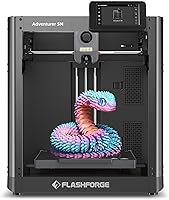
The Flashforge Adventurer 5M suits beginners who expect to try different nozzle sizes and want app tools for checking progress. Its quick-change nozzle system makes that a more practical reason to choose it than speed alone.
It has a 220 x 220 x 220 mm build volume, a CoreXY structure and a dual-sided PEI platform. The 280°C direct-drive extruder comes with a 0.4 mm nozzle and accepts optional sizes from 0.25 mm to 0.8 mm.
Smaller nozzles can suit finer features, while larger nozzles can suit thicker lines and larger shapes. Changing nozzle size also requires a matching slicer profile, so start with the supplied size.
Flashforge specifies a maximum travel speed of 600 mm/s. Use that as a motion specification, not a promise that every model will finish at the same pace.
The app tools let you monitor progress, adjust settings and receive status alerts remotely. Remote access is useful for checking a job, but it doesn't replace preparing the workspace and inspecting the first layer.
Buy it if nozzle changes and remote status tools match how you want to work. Skip it if your planned objects exceed its build space or multicolor printing is a requirement.
Its extruder temperature alone shouldn't decide your material choice. Check the complete printer and filament guidance before moving beyond your starter material.
Creality Ender 3 V3 SE: for learning with PLA, PETG and TPU
The Creality Ender 3 V3 SE suits a beginner who wants to start with PLA and later explore PETG or flexible TPU. Its Sprite direct-drive extruder supports those materials, with settings chosen for each one.
CR Touch auto-leveling and automatic Z-offset calibration address 2 common first-layer adjustments. Assembly involves a few setup steps, so allow time to work through the instructions carefully.
Dual synchronized Z-axis lead screws and Y-axis linear shafts support its motion system. The flexible PC spring steel build plate helps with removing finished parts.
Creality specifies speeds up to 250 mm/s with compatible materials and recommended settings. Flexible filament and detailed models still need settings suited to their demands.
A 32-bit silent mainboard helps reduce operating noise. That feature concerns part of the sound a printer makes, so consider the room and furniture as well.
Buy it if you want calibration help and a path into several everyday filament types. Skip it if your main priorities are the A1's broader automatic calibration or the Adventurer 5M's app monitoring tools.
Keep the first few projects simple and use PLA before changing materials. Learning one dependable workflow makes later changes easier to understand.
What filament should a beginner use?
Start with plain PLA in the diameter your printer supports. It lets you learn file preparation, adhesion and print removal before adding the demands of flexible or specialty materials.
This SUNLU option is a black, 1 kg spool with a neat winding design. SUNLU recommends a printing speed of 50–100 mm/s, so a printer's higher speed capability is not a reason to exceed the filament guidance.
The spool measures 8 inches in diameter and 2.5 inches wide, with a 2.2-inch hub hole. Confirm spool-holder fit and filament diameter before ordering.
Choose it if you want a plain starter spool for general indoor projects. Skip it if your first object needs flexibility, substantial heat resistance or a material property that ordinary PLA does not provide.
PLA can soften in hot conditions, so don't choose it for an object that will sit in a hot car. Material choice should follow the object's job.
PETG can be a useful next step for some practical parts, while TPU suits flexible objects. Both require their own profiles and handling, rather than a simple spool swap with unchanged settings.
Avoid starting with several specialty finishes or filled filaments. Some need different nozzles or more careful setup, making it harder to identify why a print fails.
Our guide to filament for beginners explains when to move beyond PLA.
How much does a beginner 3D printer cost to own?
Budget for a working setup and ongoing supplies, rather than the machine alone. A useful first setup includes filament, suitable storage and any basic tools the printer requires.
Check what comes with the printer before buying accessories. Start with required items and add tools when a real task calls for them.
| Expense | What to plan for |
|---|---|
| Filament | Finished objects, supports, scraps and failed jobs |
| Storage | A sealed container and moisture control suited to the material |
| Wear parts | Replacement nozzles and build surfaces over time |
| Removal and cleanup tools | Only tools suitable for the printer and plate |
| Optional systems | Separate equipment for features such as multicolor printing |
| Time | File preparation, maintenance and occasional troubleshooting |
The slicer can estimate material use before a job starts. Compare designs there, since a hollow organizer and a mostly solid part of the same size can use very different amounts.
Resin adds a separate set of supplies, including cleanup materials and protective equipment. Compare complete workflows if you are still deciding between printer types.
Avoid buying many upgrades before your first successful prints. See how much a 3D printer costs for more help planning supplies and ongoing expenses.
How should you prepare the space before delivery?
Choose a stable surface with enough clearance, ventilation and access. Measure the full working space, including moving parts and the filament path.
A machine's outer dimensions don't always describe the space it needs while running. Leave room for bed movement, cables and access according to the manufacturer's instructions.
Keep the printer away from loose fabric, clutter and places where people may bump it. Children need adult supervision around hot parts, moving mechanisms and print removal tools.
Consider sound before choosing a bedroom or shared desk. Fans, motion and vibration through furniture can all matter even when a printer has noise-reducing features.
Place filament where it can feed without rubbing or catching. A spool should turn freely without pulling a cable into the printer's path.
Prepare a separate place for tools and finished parts. Reaching across a moving machine to find cutters is an avoidable problem.
How do you get a successful first print?
Start with one small PLA model and the recommended profile. Keep the first job simple enough that you can watch it begin and learn from the result.
Assemble, inspect and calibrate
Follow the setup sequence, including removal of shipping restraints and checks for clear movement. Use the supplied instructions for connections, fasteners and any required calibration.
Clean the build plate using a method approved for its surface. Avoid touching the print area afterward, since oils from your fingers can interfere with adhesion.
Load filament as instructed and confirm it feeds without a snag. Complete the printer's calibration routine before starting the job.
Prepare a small, useful model
Choose a simple tray, stand or organizer without many thin features or steep overhangs. A supplied sample can also help you learn the machine before changing slicer settings.
Select the correct printer, nozzle and material profiles in the slicer. Preview the layers and check for parts that begin in midair or need supports.
Use the default layer height and infill settings for the first project. Changing several settings at once makes the result harder to explain.
Watch the first layer
Stay nearby as printing begins and look for lines that stick evenly to the plate. Gaps, loose strands or material gathering around the nozzle are reasons to stop and inspect the setup.
Don't let a visibly poor first layer continue in the hope that later layers will fix it. A small restart wastes less material than a tall print built on a weak base.
Let the part cool before removal
Wait for the plate and part to cool as instructed, then use the recommended removal method. For a flexible plate, remove it before flexing rather than bending it against the machine.
Remove supports carefully and keep fingers clear of cutting edges. Record the profile and material you used so you have a useful starting point for the next project.
What routine care does a beginner printer need?
Keep the build surface clean, filament dry and moving areas clear. Follow the manufacturer's maintenance schedule for lubrication, inspection and replacement parts.
Care for the build plate
Handle the plate by its edges when possible and clear away loose scraps before each job. Use approved cleaning products rather than assuming every surface tolerates the same treatment.
Avoid scraping hard enough to damage the coating. If adhesion changes, check cleanliness and the recommended material settings before adding glue or changing several controls.
Store filament between projects
Keep unused filament in suitable sealed storage with moisture control. Moisture can cause popping, rough surfaces and uneven extrusion, though those symptoms can have other causes too.
Secure the loose end of a spool before putting it away. Allowing it to slip under another loop can create a feeding snag later.
Keep a short maintenance record
Note nozzle changes, unusual sounds and recurring print problems. A simple record helps you connect a new issue with a recent change.
Use the specified procedure for nozzle work, including any required heating or cooling steps. Keep hands and tools away from hot surfaces and moving parts.
Which common mistakes should beginners avoid?
Avoid changing too much at once, chasing maximum speed and choosing difficult first projects. A steady starting profile makes problems easier to solve.
| Mistake | Better approach |
|---|---|
| Starting with a large, complex model | Learn the workflow on a small object first |
| Choosing the wrong slicer profile | Match the printer, nozzle and material before slicing |
| Ignoring a loose first layer | Stop and check adhesion before more material is used |
| Raising speed immediately | Establish a good result with the recommended settings |
| Making every part solid | Use suitable walls and infill for the object's purpose |
| Removing parts while very warm | Let them cool according to the instructions |
| Changing several controls together | Make one change and compare the result |
Model orientation deserves attention too. It changes where supports are needed, how clean some surfaces look and how loads act across the printed layers.
For parts that must fit together, print a small mating section before committing to the whole object. Adjusting a short sample is easier than repeatedly printing a large part.
Don't assume a downloaded model is suitable for every real use. Heat, loads, material choice and layer direction matter, especially for objects whose failure could cause injury or damage.
Is a 3D printer worth it for home use?
A printer is worth considering when you have repeated projects that benefit from custom size or shape. It is less compelling if you need only one object and don't want an ongoing hobby.
Useful reasons include organizing an awkward drawer, making hobby accessories or revising a design until it fits. Those projects give you a reason to learn the tools beyond the first novelty print.
Allow time for preparing files, clearing supports and occasional maintenance. A printer can make useful objects, but each new design still needs decisions from you.
If your project list is short, try a local printing service before committing to a machine. Our guide to whether 3D printers are worth it for home use offers more decision points.
How do you choose a 3D printer for beginners?
Choose your 3D printer for beginners by deciding which work you want the machine to simplify and which skills you want to learn. Then check that your largest planned object and complete setup fit your space.
Pick the Bambu Lab A1 if broader calibration automation is your main priority. Plan separately for AMS lite if automatic color changes are central to your projects.
Pick the Flashforge Adventurer 5M if quick nozzle changes and remote status tools fit your workflow. Pick the Creality Ender 3 V3 SE if you want a PLA starting point with scope to explore PETG and TPU.
Before ordering, choose your first model and a suitable starter spool. That turns the purchase into a specific project with clear requirements.
Compare the best 3D printers for beginners to narrow your choice, or browse the beginner printer category for help with the next step.
Frequently asked questions
What is the easiest 3D printer for a beginner?
The Bambu Lab A1 is the strongest fit here for beginners who want help with calibration, thanks to its full-auto calibration and touchscreen. The Flashforge Adventurer 5M and Creality Ender 3 V3 SE also automate bed leveling.
You still need to learn file preparation, filament loading and build plate care.
Should a beginner buy an FDM or resin 3D printer?
Choose FDM for general household objects, organizers and larger hobby projects. Choose resin when fine surface detail matters most and you have a suitable space for handling, washing and curing prints.
FDM with PLA is the simpler starting workflow for most people buying their first home printer.
Is auto-leveling necessary for a first 3D printer?
Auto-leveling is helpful rather than essential, and it is worth prioritizing if you want fewer manual adjustments. It measures the build surface so the printer can compensate for small height differences.
You still need a clean plate and suitable nozzle spacing; our guide to leveling a 3D printer explains both.
What filament should a beginner use?
Start with plain PLA in a diameter your printer supports, using the recommended material profile. Keep the first spool simple so you can learn adhesion, supports and print removal without changing several variables.
Our guide to filament for beginners explains when PETG or flexible TPU becomes a useful next step.
How much should I spend on my first 3D printer?
Set a total setup budget that includes the printer, a starter spool and any tools or separate equipment you need. Favor calibration help and a suitable build area over extras you may rarely use.
Our budget beginner printer guide helps narrow the machines while you plan for supplies.