What Can You Do With a 3D Printer at Home?
What you can do with a 3D printer includes making custom organizers, replacement knobs, hobby models, decorations, and gifts. Start with a small indoor project, then choose a printer and material around its size, detail, and strength needs.
On this page (9 sections)
- What can you do with a 3D printer at home?
- What should you print first?
- Which printer suits your home projects?
- Which filament should you buy first?
- How should you set up and care for a home printer?
- Can a 3D printer make multicolor objects?
- Are printed parts strong enough for everyday use?
- Do you need to design your own models?
- How should you decide what to make and buy?
You can use a 3D printer at home to make custom organizers, replacement knobs, hobby models, decorations, and personalized gifts. Its biggest advantage is making something that fits your exact space or purpose.
What you can do with a 3D printer depends on the material, available print space, and detail your project needs. Start with a useful object you can finish in one sitting, rather than a large model with many moving parts.
A printer builds a digital design one layer at a time. For the basics, see how a 3D printer works.
What can you do with a 3D printer at home?
Custom-fit household items and hobby accessories are strong reasons to own a printer. You gain the most when a standard item is the wrong size or shape.
What useful things can you make with a 3D printer?
Print drawer dividers, cable guides, shelf labels, paint holders, and board-game inserts. Measure the space first, including clearance for opening drawers or removing stored items.
A modular divider is a useful early project because you can print one section, check its fit, and make more. A large tray commits more material before you know whether the dimensions work.
Can you print replacement parts?
You can make simple knobs, spacers, clips, and covers if you can find or draw a suitable design. Measure the mating surfaces, screw holes, and nearby moving parts, not just the outside dimensions.
Print a small section first when the fit is uncertain. Avoid homemade replacements for electrical connections, structural supports, or parts that control safe appliance operation.
What about hobbies and gifts?
Tabletop terrain, model stands, ornaments, and name plates let you make objects around a particular interest. Large shapes and raised lettering are easier starting points than tiny faces or thin moving joints.
For gifts, confirm spelling and dimensions before printing. Leave time to remove supports and smooth rough edges rather than treating the finished print as ready to wrap.
What should you print first?
Choose a small, low-risk object with a clear purpose, such as a cable guide or open tray. A flat base and few overhangs make the first project easier to prepare.
Check the model's dimensions in the slicer, the software that turns a design into printer instructions. Preview the layers and support requirements before starting.
A common mistake is shrinking a complex model until it fits. Thin walls, small holes, and moving joints may stop working at the new size.
Try one item before filling the build plate with copies. That gives you a chance to correct fit or surface problems without wasting a batch.
Which printer suits your home projects?
Choose build space for your largest regular project and setup features for your experience level. Speed matters most when you expect to make repeated parts.
The Bambu Lab A1 suits beginners who want automatic calibration, including bed leveling and Z-offset adjustment. Its touchscreen and quick-swap nozzle also make it a practical choice for someone learning routine operation.
Its 256 x 256 x 256 mm build volume gives room for larger organizers and model sections. Skip it if your main goal is tiny display figures where fine facial detail matters more than general household use.
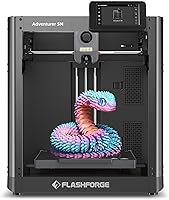
The Flashforge Adventurer 5M suits makers who expect to revise brackets, holders, and hobby parts repeatedly. It combines a CoreXY structure, automatic bed leveling, and a 220 x 220 x 220 mm build volume.
Flashforge specifies a maximum travel speed of 600 mm/s, but travel speed is not a whole-job completion rate. Model shape, material settings, and cooling still affect how long a print takes.
Skip the 5M if your planned one-piece objects exceed its build space. Splitting a model is possible, but joints add assembly work and can affect appearance or strength.
For a broader comparison, read our 3D printer buying guide for beginners. If tiny miniatures are your main goal, compare resin and FDM printers before choosing.
Which filament should you buy first?
Start with PLA for low-risk indoor objects, then change materials when the project calls for it. Choose the color and pack size around projects you expect to finish.
The Elegoo Matte PLA 4kg Bundle suits decorative work in Sakura Pink, Lavender Purple, Ice Blue, and Sunshine Yellow. It contains 1.75 mm PLA with a low-gloss finish.
Choose it for coordinated desk accessories, ornaments, or name plates. Skip the bundle if you only need neutral parts or are still deciding whether you enjoy printing, since four colors are a larger starting commitment.
Elegoo advises keeping the door open when using this matte PLA in an enclosed printer. Follow the filament's temperature guidance rather than carrying settings over from another material.
The Creality PLA 2-Pack Filament suits plain organizers, labels, and early design drafts. It provides 2 kg across black and white spools, using 1.75 mm filament.
Choose it if neutral colors cover most of your plans. Skip it if a matte pastel appearance is central to the project, and don't choose PLA for hot locations just because the color fits.
For help choosing a starting material, see PLA, PETG, and other beginner filament options. Avoid buying several specialty materials before confirming your printer supports their requirements.
How should you set up and care for a home printer?
Use a stable surface in a ventilated space, with enough clearance for the machine's moving parts and spool. Keep children and pets away from hot components and moving mechanisms.
Follow the setup instructions, load the correct filament profile, and clean the build plate as directed. Automatic leveling helps with geometry, but it cannot remove grease or fix a loose component.
Watch the first layer before leaving the printer to continue. If lines lift, bunch around the nozzle, or fail to join, stop and correct the cause rather than letting the job grow.
For persistent first-layer problems, review how to level a 3D printer and why auto-leveling helps.
Let the plate cool before removing a print, and use the recommended removal method. Keep the plate clean and inspect the nozzle and moving parts on the maker's maintenance schedule.
Store filament sealed with desiccant when it is idle, and secure the loose end before putting a spool away. Moisture and tangled filament can interrupt an otherwise sound print.
Can a 3D printer make multicolor objects?
Yes, with compatible equipment or a design assembled from separate colored pieces. Printing separate parts is a simple way to add contrast without automatic filament changes.
The Bambu Lab A1 needs AMS lite for automatic multicolor printing, available separately or with the A1 Combo. A standard A1 purchase does not by itself provide that capability.
Automatic color changes can increase print time and waste material during changes. Read what AMS does on a 3D printer if multicolor labels or figures are central to your plans.
Are printed parts strong enough for everyday use?
Many prints suit light household use, but strength depends on material, wall thickness, orientation, and load. A part can fit perfectly and still split between layers.
Consider how force will act on a hook or clip before choosing its print direction. Adding infill alone will not solve a weak joint or poor orientation.
PLA can soften in hot conditions, so avoid using it near heaters or inside hot cars. For food-contact objects, the material name alone does not establish that the finished print is suitable.
Don't assume a downloaded design is safe because it looks finished. Check for sharp edges and breakable pieces, especially around children.
Do you need to design your own models?
No, ready-made models are enough to begin, provided their dimensions and intended use match your project. Read any assembly notes and check which extra hardware is needed.
Basic design skills become useful when you need a specific hole spacing, drawer width, or cable diameter. Begin with simple boxes and spacers before attempting curved parts or moving mechanisms.
Keep notes on dimensions and changes between versions. Changing several settings at once makes it harder to understand why a fit improved or failed.
How should you decide what to make and buy?
Let your next three projects guide the purchase when deciding what you can do with a 3D printer. A machine earns its space when custom fit, repeat use, or learning the skill matters to you.
Choose the A1 for automatic calibration and larger general home projects. Choose the Adventurer 5M for repeated parts that fit its build space, especially if fast motion is useful to your workflow.
Pick the Elegoo bundle for pastel decorative work or the Creality pack for neutral organizers and design drafts. Start with one small print before committing material to a set.
If you only need one common object, buying it may take less time and effort. Our guide to whether a 3D printer is worth it for home use helps weigh that choice.
Write down your project sizes, materials, and workspace limits before ordering. Use our 3D printer buying guide for beginners to turn that list into a suitable setup.
Frequently asked questions
What are the most useful things to make with a 3D printer?
The most useful home prints solve a size or fit problem: drawer dividers, cable guides, storage clips, replacement knobs, and hobby organizers. Choose something you can measure and inspect easily.
Start with light-duty indoor use, where a broken print would be inconvenient rather than dangerous.
Can a home 3D printer make replacement parts?
Yes, a home 3D printer can make simple replacement knobs, spacers, clips, and covers when you have a suitable design. Measure the original part and allow clearance where pieces meet.
Use the manufacturer's replacement for parts that affect electrical safety, structural support, high heat, or safe appliance operation.
What material should a beginner use for home 3D prints?
PLA is a useful first material for indoor organizers, models, and decorations because it is generally straightforward to print. Choose a compatible spool and begin with the recommended settings.
For outdoor, hot, or heavily loaded parts, choose the material around those demands rather than using leftover PLA.
Can you make toys and gifts with a 3D printer?
Yes, you can print ornaments, name tags, tabletop accessories, and personalized gifts from suitable designs. Check finished pieces for sharp edges, loose parts, and fragile joints.
Small pieces can be choking hazards, and a downloadable toy design does not establish that the finished object is safe for children.