Bambu Lab A1 vs P1S: Which Should You Buy? (October 2026)
For Bambu Lab A1 vs P1S, choose the A1 for a first printer focused on automatic calibration, or the P1S for projects that need ABS, ASA or an enclosed body. Add the compatible AMS system only if your projects call for multicolor printing.
On this page (11 sections)
- Bambu Lab A1 vs P1S: what should decide your choice?
- Who should buy the A1, and who should skip it?
- Who should buy the P1S, and who should skip it?
- Which materials should guide the decision?
- Is multicolor worth adding from the start?
- Will your models fit, and where will the printer go?
- Does the faster speed figure make the P1S the better buy?
- What should you do during setup and the first prints?
- How much care will either printer need?
- Which buying and printing mistakes should you avoid?
- Which should you buy, the Bambu Lab A1 or P1S?
Choose the Bambu Lab A1 for a first printer focused on automatic calibration, or the P1S for projects that need ABS, ASA or an enclosed body. The useful starting point in Bambu Lab A1 vs P1S is what you plan to make, followed by where you'll print it.
The A1 suits buyers who want help with routine calibration and accessible controls. The P1S suits buyers whose material needs justify an enclosure, including beginners with a clear project in mind.
Before choosing, name 3 objects you want to print. A shelf ornament, an outdoor bracket and a flexible part can lead to different material and workspace needs.

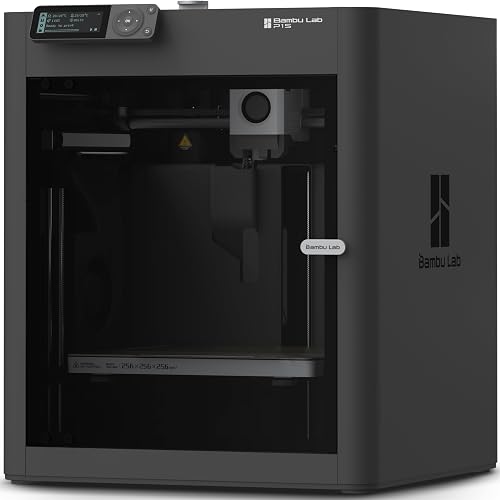
Bambu Lab A1 vs P1S: what should decide your choice?
Choose by material requirements first, then by workflow. Calibration features matter on every job, but they can't make an unsuitable material work for your project.
Start with the part's job: will it sit on a desk, carry a load, face sunlight or fit against another object? Those demands help narrow your filament choice before speed or color enters the decision.
Next, consider how you want to work. The A1 emphasizes automatic calibration and convenient controls, while the P1S gives you an enclosed body with support for a broader set of named materials.
Neither needs to be reserved for an expert. A beginner with a specific ABS project has a stronger reason to choose the P1S than an experienced hobbyist who only wants simple indoor models.
Who should buy the A1, and who should skip it?
Buy the A1 if you want several calibration tasks handled automatically. Its touchscreen and 1-clip quick-swap nozzle also suit buyers who want straightforward controls and convenient nozzle changes.
It calibrates Z-offset, bed level, vibration resonance and nozzle pressure for each print job. Active flow rate compensation adjusts extrusion using sensor readings, giving it another tool for controlling how filament leaves the nozzle.
These features are useful if you want to spend your attention on model choice, orientation and learning the slicer. You'll still need to understand supports, material settings and bed adhesion as your projects become more demanding.
Skip the A1 as your default choice if ABS or ASA is already central to your plans. The P1S has explicit support for both, making it the clearer recommendation here.
Also pause if a particular specialist filament is your main reason for buying. Confirm its compatibility before committing rather than treating automatic calibration as proof that any spool will work.
For a closer look at the A1's controls and features, read our Bambu Lab A1 review.
Who should buy the P1S, and who should skip it?
Buy the P1S when you have a clear reason to use its enclosure and material support. It makes sense for buyers planning functional parts in ABS or ASA rather than choosing an enclosure for appearance alone.
Bambu Lab classifies PLA, PETG, TPU, PVA, PET, ABS and ASA as ideal materials for the P1S. PA and PC are classified as capable, which calls for more care when choosing a specific filament and its settings.
Carbon- and glass-fiber-reinforced polymers are not recommended. Don't assume that support for a base polymer also covers a reinforced version of that material.
Skip the P1S if you can't name a project that benefits from its material options and you mainly want the A1's calibration workflow. You don't need to plan around advanced filaments just because you might try them someday.
An enclosed printer also needs a suitable location. Read our enclosed vs open-frame printer guide if you're still deciding what an enclosure contributes.
Bambu Lab A1 vs P1S for a first printer
The A1 is the better starting point for calibration-focused beginners, while the P1S fits beginners with defined material needs. Your first printer should match the projects you'll actually attempt in the first few months.
Write down those projects before comparing accessories. That keeps a possible future hobby from outweighing the work you want to do now.
Which materials should guide the decision?
Choose the material for the finished part, then choose the printer. For general FDM work, PLA is a common starting point for indoor models, while other materials may suit different demands.
A decorative figure needs a different balance of appearance, flexibility and heat resistance than a workshop fixture. Filament choice matters as much as the shape of the model.
For ABS or ASA, the P1S is the clear choice between these options. Bambu Lab says its enclosed body improves performance with advanced filaments.
An enclosure helps manage the printing environment, but it doesn't replace ventilation. Follow the printer and filament instructions, and choose a location suitable for the material you plan to use.
Our guide to choosing filament for a beginner 3D printer explains common starting materials. For workspace planning, see the benefits of a 3D printer enclosure.
Is multicolor worth adding from the start?
Add multicolor equipment when color changes within a print serve a clear purpose. Single-color printing is enough for many brackets, organizers, prototypes and models you'll paint afterward.
The A1 uses AMS lite, available separately or in an A1 Combo. Its RFID feature can match print settings for Bambu filaments.
The P1S uses Bambu Lab AMS and supports up to 16 colors with the required setup. Confirm the package contents and equipment needed for your intended color count before ordering.
Color changes generally add print time and consume filament during transitions. A model with frequent changes across many layers can use far more material than its finished size suggests.
Multimaterial printing also needs planning. Two filaments must suit the printer, the feed system and the job; different temperature or adhesion needs can make a combination unsuitable.
If you'll mostly print practical parts, start with one color and learn the workflow first. Our guide to AMS on a 3D printer explains the system, while our multicolor printer guide covers the wider buying tradeoffs.
Will your models fit, and where will the printer go?
Check your largest planned model in a slicer before buying. The A1 has a 256 x 256 x 256 mm build volume, but the object's orientation and supports affect usable space.
Bambu Lab describes that volume as suitable for a one-piece helmet. A particular helmet may still need scaling, a different angle or separate sections.
Confirm the P1S build volume if a large object drives your decision. Don't use the machine's outside dimensions to estimate the space available for a print.
For either printer, measure the whole working area. Allow access for loading filament, removing parts, opening any doors and following the required movement clearances.
Use a stable surface that won't rock during printing. Keep tools and loose objects out of the printer's working area, and leave room to handle a finished part safely.
Does the faster speed figure make the P1S the better buy?
Use a sliced version of your own model to judge time needs. A maximum speed figure doesn't describe the duration of every print.
The P1S is rated for up to 500 mm/s with 20,000 mm/s² acceleration, while the A1 has 10,000 mm/s² acceleration. These figures don't provide a universal ratio for how quickly they finish a part.
Small details, short moves, supports and material flow limits all affect printing time. A model may spend little of its job moving at the maximum speed.
For practical buying help, think about output: one weekend model, several parts overnight or repeated batches. Then consider total time, including supports, color changes and any assembly after printing.
What should you do during setup and the first prints?
Follow the setup instructions, then begin with a small, simple model. A short first job makes it easier to spot a loading or adhesion problem before committing to a large print.
Bambu Lab advertises a 15-minute setup for the P1S. Treat that as an assembly claim and leave extra time to learn the software, prepare the surface and review the safety instructions.
Use the correct printer, nozzle and filament profile in your slicer. Changing several settings at once makes it harder to identify what caused a poor result.
Watch the first layer before settling into a longer job. Look for lines that stay attached and join together, rather than loose strands or gaps.
Automatic bed leveling helps account for bed shape; it doesn't remove grease or debris. Our guide to how auto-leveling helps a 3D printer explains the difference between leveling and other first-layer needs.
Keep a note of the material, profile and any change you make. A simple record is more useful than trying to remember which combination worked on an earlier project.
How much care will either printer need?
Expect routine cleaning, filament care and occasional maintenance with either printer. Automatic features reduce some adjustments, but they don't keep the print surface or filament clean.
Handle the build surface by its edges where possible. Follow its cleaning instructions, and let parts cool as directed before removal.
Store filament according to its material needs, especially after opening a spool. Moisture can contribute to rough surfaces, stringing or inconsistent extrusion, so check storage before repeatedly changing slicer settings.
Inspect the nozzle area and filament path when a problem appears. Remove debris and perform lubrication only as the printer's instructions direct.
The A1's quick-swap nozzle makes nozzle changes convenient, but safe handling still matters. Follow the cooling procedure and confirm that any replacement suits the printer and your intended material.
Don't promise yourself a silent workspace, either. The A1 has active motor noise canceling, but motor noise is only one source of sound in an FDM printer.
Which buying and printing mistakes should you avoid?
Avoid buying around a headline feature without checking the whole job. A printer, filament and model must work together.
- Buying multicolor equipment without a use for it. Decide which models need color changes within layers rather than paint, separate parts or a single filament.
- Treating calibration as a cure for adhesion problems. Check surface cleanliness and the correct material profile before changing unrelated settings.
- Assuming an enclosure handles emissions. Plan ventilation around the filament instructions instead of relying on closed panels alone.
- Choosing maximum infill for every part. Wall thickness, orientation and load direction also affect how a printed object behaves.
- Starting with a long, complex model. Learn loading, slicing and removal on shorter jobs before adding difficult supports or color changes.
- Ignoring the finished part's limits. Don't assume a printable model is suitable for a safety-critical use merely because it looks solid.
For parts that must fit together, allow time for a small fit sample before printing the entire assembly. Holes, joints and clearances may need adjustment even when the printer completes the model cleanly.
Which should you buy, the Bambu Lab A1 or P1S?
For Bambu Lab A1 vs P1S, pick the A1 when automatic calibration is your main priority, and pick the P1S when your projects need its enclosure and supported materials. Make that decision before adding a multicolor system.
Choose the A1 for learning the workflow with accessible controls and convenient nozzle changes. Choose the P1S for a defined ABS or ASA project, provided you've also planned the workspace that material needs.
Before ordering, settle 3 things: your first model, its filament and the printer's location. If any of those is still unclear, our 3D printers for beginners guide will help you turn a shortlist into a workable plan.
Frequently asked questions
Is the Bambu Lab A1 or P1S better for beginners?
The A1 is the better fit for beginners who prioritize automatic calibration and touchscreen controls. Choose the P1S instead if your first projects already call for ABS or ASA, and plan a suitable workspace for those materials before buying either printer.
Does the Bambu Lab A1 need AMS lite?
The A1 needs AMS lite for multicolor printing, but not for single-color jobs. You can get it separately or with an A1 Combo, so decide whether you need color changes within a model before adding another device to your workspace.
Does the Bambu Lab P1S come with multicolor printing?
The P1S needs a connected Bambu Lab AMS system for multicolor printing, so don't assume the printer alone provides that function. It supports up to 16 colors with the required setup; confirm the bundle contents and equipment needed for your intended number of colors before ordering.
Can the Bambu Lab A1 print a helmet?
The A1 has a 256 x 256 x 256 mm build volume, and Bambu Lab describes it as suitable for printing a helmet in one piece. Fit still depends on the specific helmet, its scale and its orientation, so check the model in a slicer before buying.
Which Bambu Lab printer is better for advanced filaments?
The P1S is the clearer choice here for ABS and ASA because it has an enclosed body and supports both materials. Bambu Lab classifies PA and PC as capable rather than ideal, and doesn't recommend carbon- or glass-fiber-reinforced polymers, so check the exact filament before committing.


